
Affiliate Marketing Tools Checklist: What to Set Up First
You have a small budget set aside and a dozen tool tabs open, and you still do not know whether to buy a domain, hosting and an email tool all at once. This free checklist is for beginners building a first affiliate site on a small budget. It turns “which tool should I buy?” into 24 short tasks across six jobs, each with a test that tells you when the setup works. You finish with one working setup for the job in front of you, and a page-8 review of what to keep, change or cancel.
- 24 checks in six categories, each with a “done when” test
- A free lesson section for every check
- Free and already-owned routes first; a paid tool only when a free one stops you
- An 8-page fillable PDF and a web version, plus an optional Word copy
Free. One short email, reply VERIFY, and the link is yours.
The checklist recommends no brand. Some pages we link to contain affiliate links (affiliate disclosure).
Short answer: do you need everything at once?
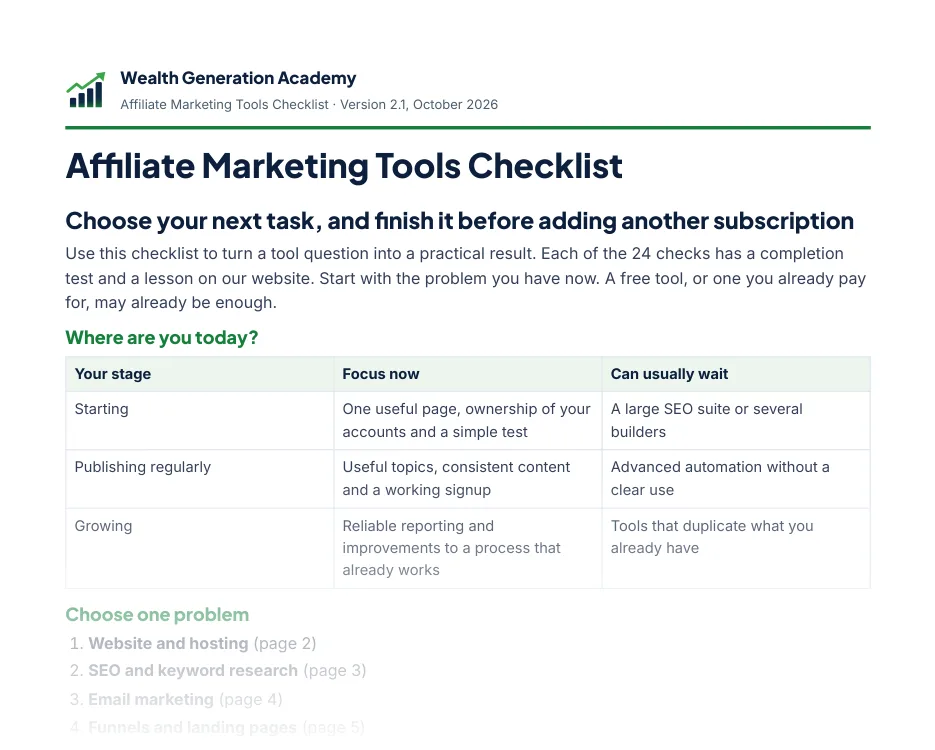
No. Set up for the job in front of you. For a first site, that is one place to publish one useful page, in accounts you own. An email tool earns its place once you publish regularly and want a working sign-up. Reporting tools and large suites come when you are growing. Until a free plan, or a tool you already pay for, stops you doing the next step, keep using it.
Affiliate marketing tools for beginners: pick one job first
The checklist starts with one question you can answer today. Find your stage, then choose the one job that is stopping you this week. Everything else can wait.
| Your stage | Focus now | Can usually wait |
|---|---|---|
| Starting | One useful page, ownership of your accounts and a simple test | A large SEO suite or several builders |
| Publishing regularly | Useful topics, consistent content and a working signup | Advanced automation without a clear use |
| Growing | Reliable reporting and improvements to a process that already works | Tools that duplicate what you already have |
Read the table as an order of buying: publishing first, a working sign-up next, reporting later. The checklist says to start with a free plan or a tool you already pay for, and to pay only for a feature you actually need.
Your first step: write down the one job you need done this week, for example “one page that works on a phone”. Then open the matching lesson below; the lessons are free to read now. Want dated prices for a first-month budget? Section 6 of the free Starter Kit has a $0 path and a low-cost path for each job, with prices checked on the vendors’ pages on October 23, 2026.
What is in the checklist: 24 checks, six categories
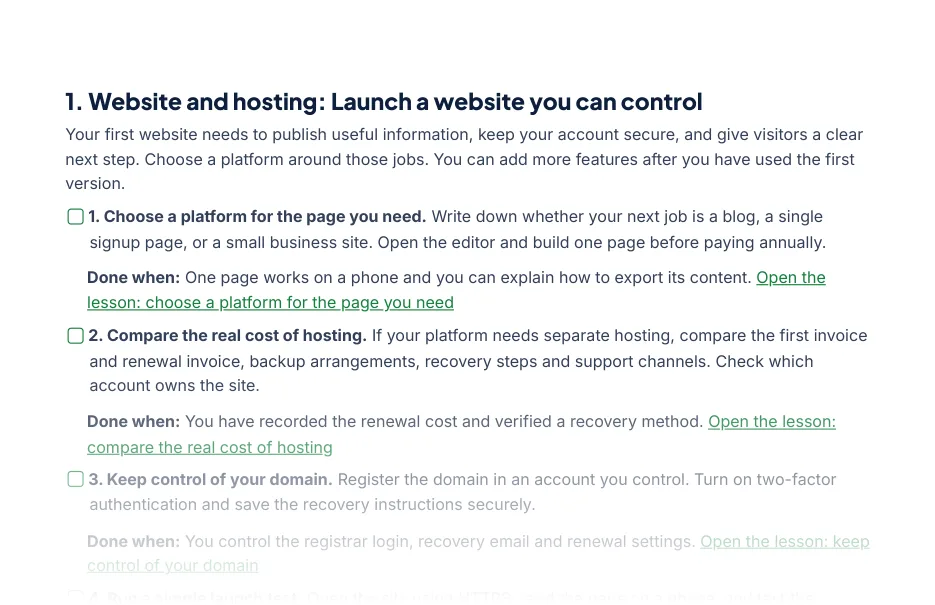
Each category has its own page with four checks. Every check is a short task, a “done when” test and a link to the lesson section that walks you through it. Each page ends with a free route and a note on when a paid tool may help.
Page 8 is a review sheet: your smallest useful stack (job, monthly or renewal cost, keep, change or cancel), four money-saving checks before you renew anything, common tool mistakes, and links to our tool comparisons.
Six checks as they appear, one from each page
Every check ends with a test you can see. This is what “finished” means in each category.
| Category and check | Done when |
|---|---|
| Website and hosting: compare the real cost of hosting | You have recorded the renewal cost and verified a recovery method. |
| SEO and keyword research: build a list of ten specific questions | Ten questions are grouped by intent and one has a practical article outline. |
| Email marketing: save the person as well as the submission | One correct contact record holds the submitted details and when and where the person signed up. |
| Funnels and landing pages: write one clear download promise | A visitor can understand the resource, audience and next action on a phone. |
| Content and design: make a graphic that explains one idea | One readable graphic supports the lesson and its editable source is saved. |
| Analytics and tracking: record where useful visits come from | A test visit is recorded under the correct campaign without personal data in its URL. |
Why the hosting check asks for the renewal cost: the first invoice is often a discounted term. The checklist itself lists no prices; this dated example comes from the Starter Kit’s tool budget (prices checked on the vendors’ pages on October 23, 2026) lists Hostinger Premium at $119.52 for 48 months, then $10.99 a month. The check makes you write down the second number before you pay the first.
What it does, and what it does not do
- It tells you which job to finish first and how to test that it works. It does not rank brands or name a “best tool”.
- It lists no prices or plan limits, because they change. Our reviews give the date each price was checked.
- The checklist never asks you to buy anything. Some of our comparison pages contain affiliate links; we may earn a commission if you buy through them, and those pages say so (affiliate disclosure). One of the follow-up emails describes our own $37 Launch Blueprint; it is optional, and the checklist is complete without it.
- It does not promise income. Results depend on your work, your audience and your market (earnings disclaimer).
How it was made, and how we make money
Wealth Generation Academy wrote it. Our pages are drafted with AI assistance, then checked against our editorial policy and the sources they cite. Every tool review on this site is research only, and says so. Where we have our own data, we publish it: how we test a page with Lighthouse before paying for hosting up front, and how we make sure a free download reaches a real inbox.
We earn affiliate commissions on some tools we review, and we sell one product of our own, the $37 Launch Blueprint. The checklist recommends no brand and is complete on its own.
Get the free checklist in three steps
- 1
Enter your first name and email
Use the address where you want the file. No card, no payment.
- 2
Reply VERIFY to our short email
It comes from Wealth Generation Academy. Reply to it with the word VERIFY from the same address. A form accepts typos, fake addresses and bots, so the file goes only to an address that confirms it is real. The sender address ends in thesmartlearningpath.com because our sites share one mail service.
- 3
Get the link to your download page
We email the link once your reply arrives: a median of 60 seconds in our own test of 14 sign-ups on 22 October 2026. Bookmark the page; the files stay there.
Get the Free Affiliate Marketing Tools Checklist
Free: the 8-page PDF, the web version and an optional Word copy.
Questions about the Tools Checklist
Is the Affiliate Marketing Tools Checklist really free?
Yes. It costs nothing and no card is asked for. Enter your first name and email address, reply VERIFY to our first email, and we email you the link to the checklist.
Does it tell me which brand to buy?
No. Its 24 checks are tasks and tests, not brand picks, and it lists no prices, because prices change. When you are ready to compare specific tools, page 8 links our comparison guides, such as Bluehost vs Hostinger. Those pages contain affiliate links, and they say so.
Do I need to buy any tools to use it?
No. Each category page includes a free route or a tool you may already pay for, and says when a paid tool may help. Some jobs, such as a custom domain, usually cost money; the checklist helps you decide when.
Do I need any experience?
No. Each check is a short, plain-language task with a done-when test, and every check links to the lesson section that walks you through it.
What format is it in?
An 8-page PDF you can fill in and tick on screen, a web version whose tick boxes are remembered in your browser, and an optional Word copy.
How do I get access to the checklist?
Enter your first name and email address in the form on this page. We send you a short email first, from Wealth Generation Academy (wga@mail.thesmartlearningpath.com), with the subject “Reply VERIFY to get your Affiliate Marketing Tools Checklist”. Reply to that email from the same address with the word VERIFY, and we email you a link to the checklist (the 8-page PDF, the web version and an optional Word copy) as soon as your reply arrives. Then come seven short emails over the next 25 days on using it (one describes our own $37 Blueprint), then at most one email a week, when we publish a new guide. The unsubscribe link at the bottom of every email stops all of them. Can’t find the first email? Check Spam, Junk and Promotions, or submit the form again with the right address.
Where to go next
- Not sure about your niche yet? Start with the free Affiliate Business Starter Kit; its section 6 is a first-month tool budget with dated prices.
- Thinking of paying for a tool? The free commission calculator shows how many sales a month it needs to pay for itself.
- About to send readers to a sign-up form? Test it first with the free Email Delivery Rehearsal Kit.
- Ready to compare specific tools? See the affiliate marketing tools we compare for each job; every price we have checked carries its date.