
Affiliate Commission Calculator: Your Real EPC and Net Per Sale
A network shows an EPC that looks encouraging, then a month of your own clicks earns far less, and you start to wonder whether affiliate marketing works at all. Part of the gap is often arithmetic: your own conversion rate, and the sales that get refunded. This free calculator is for beginners comparing programs, or deciding whether a paid tool can pay for itself. Type in one program's terms and your own numbers, and you get a net figure per sale and per click that you can explain, before you spend money on either.
- Net commission per sale, after refunds and reversals
- Your own earnings per click, not a network average
- Break-even sales and clicks for a paid tool
- Free workbook: recurring commission with cancellations and program limits
Educational tool only. It does arithmetic on your assumptions; it does not predict earnings (earnings disclaimer). How we make money: some pages on this site carry affiliate links (affiliate disclosure). This calculator names no programs and earns us nothing.
How to use it in three steps
- 1
Open the program's terms
Find the commission rate (or flat amount) and the refund or reversal rules, usually on its affiliate, partners or terms page.
- 2
Type them in below
Add a reversal rate you can explain from those rules, your clicks and your conversion rate. Not sure yet? Try a cautious figure and a hopeful one.
- 3
Read the net figures
Compare the expected net per sale and your earnings per click with the example below, before you decide the program is worth your time.
Done when: you can say, in one sentence, why your net per sale is higher or lower than the headline commission.
Calculate one program
Example values are filled in: an illustrative program that pays 50% on a $49 product. Replace them with your program's terms and your own numbers. Nothing you type leaves this page.
What this calculator cannot tell you
It cannot tell you what you will earn. Every result is only as good as the clicks, conversion rate and refund rate you type in, and a network's published EPC is an average across many affiliates, not a forecast for your link. Taxes, payment fees and payout thresholds are not included.
Next step: to replace guesses with your own numbers, tag your links and keep clicks and commissions in separate columns. Our affiliate tracking lesson shows how with free tools.
Before you pay for a tool: what it needs to earn back
Comparing a free plan with a paid one? Divide the paid tool's monthly renewal price by your expected net per sale, then by your conversion rate. With the example figures above, a $29-a-month tool needs 2 sales a month, which at an 8% conversion rate means 25 clicks. If you have no clicks yet, the honest answer is that a paid tool cannot be earned back from commission this month, so the free route wins until a real limit stops you.
The calculator above shows this as “Sales a month to cover the tool” and “Clicks a month for those sales”. Use the renewal price, not a first-month discount.
Four terms in plain words
- EPC (earnings per click)
- What a click on your link earned on average: your commission divided by your clicks. A network's EPC mixes many affiliates' traffic, so yours will differ.
- Reversal
- A sale that was refunded or cancelled, where the program takes the commission back. Whether a refund reverses your commission, and for how long after the sale, is set by each program's terms.
- Recurring limit
- Some subscription programs pay you every month a customer stays; some stop after a set number of months. The terms say which.
- Break-even
- The sales a month a paid tool needs before its cost is covered by your net commission.
Why the headline rate is only half the answer
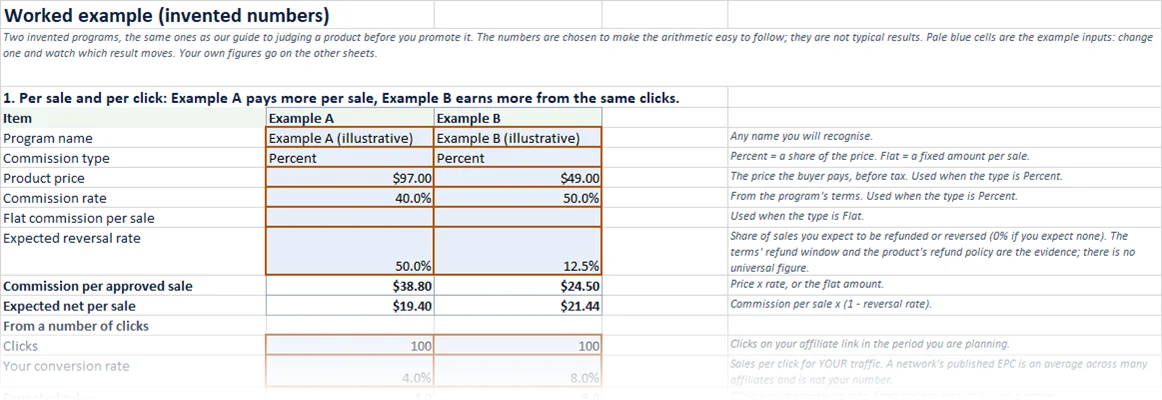
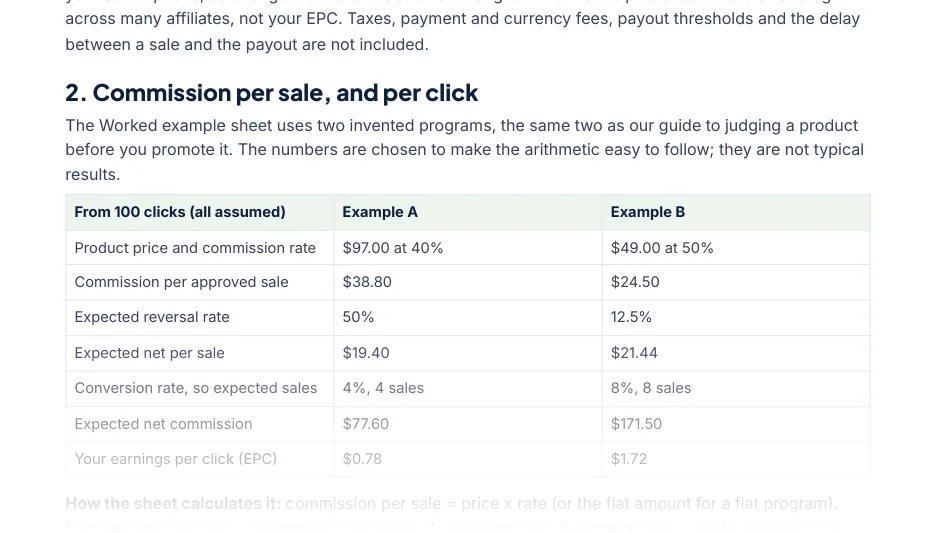
Two illustrative programs, the same ones as our guide to judging a product before you promote it. The numbers are invented to make the arithmetic easy to follow; they are not typical results.
| Example A | Example B | |
|---|---|---|
| Price and rate | $97 at 40% | $49 at 50% |
| Commission per sale | $38.80 | $24.50 |
| Sales from 100 clicks (assumed) | 4 | 8 |
| Sales reversed (assumed) | 2 | 1 |
| Net commission | $77.60 | $171.50 |
Example A pays more per sale on paper. Once the assumed conversion and refund rates are in the same calculation, Example B earns more than twice as much from the same traffic. Read more on why network EPC misleads beginners and on pending, approved and reversed commissions.
Get the free workbook and guide
The workbook does everything above for up to three of your own programs side by side, and adds a 24-month recurring sheet: one group of customers cancelling at a steady rate, with the program's recurring limit. A labelled worked example sheet shows every result filled in before you type anything, and a 5-page guide explains each sheet and what the numbers cannot tell you.
| Sheet | What it answers |
|---|---|
| Start here | How to use it, what each kind of cell means, and its limits |
| Per sale | Net per sale after refunds, and what your clicks earn, for up to three programs |
| Recurring | 24 months of a subscription program, with cancellations and a payment limit |
| Break-even | The sales and clicks a month a paid tool needs |
| Worked example | All three calculations filled in with invented numbers |
- Excel workbook (.xlsx) for Microsoft Excel, tested there; input checks and plain messages instead of error codes
- 5-page PDF guide you can fill in, plus an optional editable Word copy
- Enter your first name and email.
- Reply VERIFY to the short email we send from Wealth Generation Academy.
- We email you the link to your download page, with the workbook and the guide.
The workbook is free and names no affiliate programs.
Questions
Does this calculator tell me how much I will earn?
No. It does the arithmetic on your own assumptions about clicks, conversion and refunds. Change an assumption and the answer changes. Nothing here is a prediction or a promise of income.
Why is my EPC different from the EPC a network publishes?
A network's EPC is an average across many affiliates with different traffic. Your EPC comes from your own clicks and your own conversion rate, which is why the calculator asks for them.
What reversal rate should I use?
There is no universal figure. Read the program's refund window and the product's refund policy, then try a cautious rate and a hopeful one, and plan around the cautious result.
Can I compare more than one program?
Yes. The calculator on this page works on one program at a time; change the terms and compare. The free workbook has columns for three programs side by side, and you can save a copy of it for more.
Does the calculator recommend any programs?
No. It names no affiliate programs and earns us nothing. The two examples are invented. Some other pages on this site contain affiliate links, and they say so.
Is the workbook really free, and what do I need to open it?
Yes, it is free. It is an Excel workbook, tested in Microsoft Excel. Enter your first name and email, reply VERIFY to the short email we send, and we email you the link to the workbook and its guide.
Where to go next
- Collect each program's terms first: section 5 of the free Affiliate Business Starter Kit is a terms card for three programs.
- Replace guesses with your own clicks: the affiliate tracking lesson shows how to keep clicks and commissions in separate columns with free tools.
- Still choosing programs? Read how to find affiliate programs.
- Deciding on a tool? The free Tools Checklist says what to set up first and what can wait.