
SPF and DMARC Record Checker
Your first subscriber signs up, and the welcome email lands in spam. Before you send another one, check the records that tell Gmail and Yahoo your mail is really yours. Paste one here and see what each part means, in plain English.
- Paste an SPF or DMARC record and see each part explained
- Flags the common mistakes: two SPF records, too many lookups, +all, no reports
- Free kit: five rehearsals, a test log and a fix guide for failed tests
The checker works on this page; the full kit comes by email after you reply VERIFY.
Educational tool only; not legal advice. How we make money: some pages on this site carry affiliate links (affiliate disclosure). This checker and the kit recommend no email tools and earn us nothing.
SPF, DKIM and DMARC in 30 seconds
- SPF
- A list of the servers allowed to send mail for your domain. One TXT record at your domain, starting v=spf1.
- DKIM
- A signature your email tool adds to each message, checked against a key you publish. Your email tool gives you the exact record.
- DMARC
- Tells receivers what to do when a message fails both, and where to send reports. One TXT record at _dmarc.yourdomain.com, starting v=DMARC1.
What to do first: 1. Copy your SPF and DMARC records from your DNS provider or email tool. 2. Paste each one into the checker below and fix any error it shows. 3. Send yourself a test email and check its Authentication-Results line in Gmail. Getting this right before your first launch email removes one common, fixable reason for mail going to spam.
Check an SPF or DMARC record
Paste one record. An example SPF record is filled in; replace it with yours. The checker reads only the text you paste: nothing is looked up, stored or sent.
An SPF record starts with v=spf1 and is published at your domain. A DMARC record starts with v=DMARC1 and is published at _dmarc.yourdomain.com.
What the checker cannot tell you
It cannot see records inside the ones you include, or whether your DKIM signature passes. For that, send yourself a test email and look at its Authentication-Results line in Gmail (More, then Show original). The kit walks through it.
Two common mistakes, fixed
Two SPF records on one domain
Before (two TXT records):
v=spf1 include:_spf.google.com ~all
v=spf1 include:mailgun.org ~all
A domain may publish only one SPF record; with two, receivers return a permanent error and SPF fails. After (one record):
v=spf1 include:_spf.google.com include:mailgun.org ~all
DMARC with nowhere to send reports
Before:
v=DMARC1; p=none
Without a rua tag, no aggregate reports are generated, so you cannot see who sends mail as your domain. After:
v=DMARC1; p=none; rua=mailto:dmarc@yourdomain.com
The domains and addresses above are examples. Use the include values your own email tools give you.
What Gmail and Yahoo ask of senders (as of October 2026)
- Every sender: set up SPF or DKIM, and keep the spam complaint rate below 0.3%.
- Bulk senders (Gmail: 5,000 or more messages a day to Gmail accounts): SPF and DKIM, plus a DMARC record with at least p=none.
- Bulk senders' marketing email: one-click unsubscribe and a clearly visible unsubscribe link, honoured within 48 hours (Gmail) or 2 days (Yahoo).
From Gmail's email sender guidelines and sender guidelines FAQ, and Yahoo's sender best practices. Our email deliverability guide explains each one.
Get the free Email Delivery Rehearsal Kit
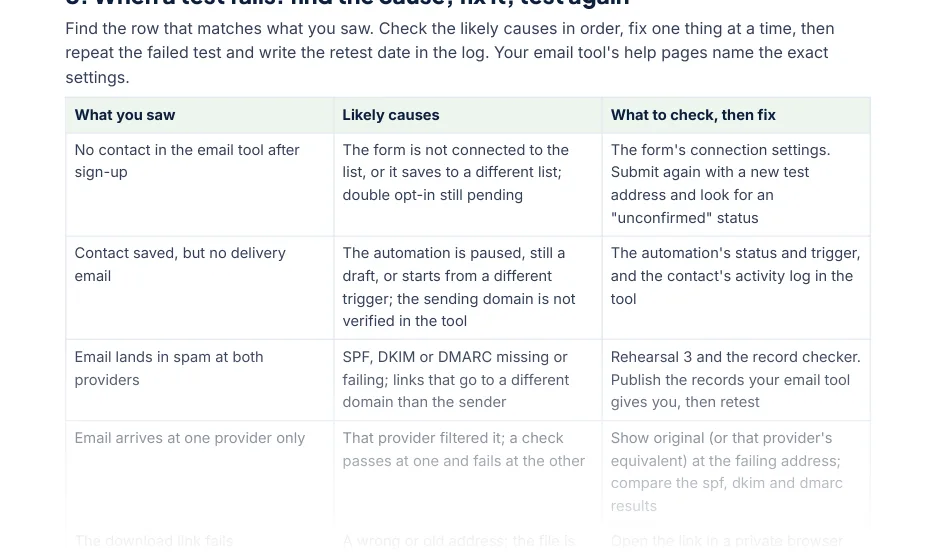
Play the reader with two addresses you control and check, step by step, that the form saves the person, the delivery email arrives with a working link, your records are in place, unsubscribing stops every email, and a second sign-up does not start a second sequence.
Your first 15-minute task, from the kit: create two test addresses you control (one Gmail, one at another provider), sign up to your own form with each, note the time, and fill in the first two rows of the test log.
- 6-page PDF guide: five rehearsals, a test log and a fix guide for failed tests
- Test-log workbook for Microsoft Excel: expected and actual results, fixes, retests and a pass count
- A first 15-minute task you can do today
Enter your first name and email. Reply VERIFY to the short email we send, and we'll email you the kit link. The kit is free and recommends no email tools.
Questions
Does the record checker look up my domain?
No. It reads only the text you paste in and explains it. Nothing is looked up, stored or sent. Copy the record from your DNS provider or your email tool's authentication page.
Will passing these checks get my emails into the inbox?
No test can promise that. Gmail and Yahoo decide message by message. Authentication, a working unsubscribe and low complaints are requirements they publish, so the kit checks those, and a rehearsal shows what happened to your test.
Do I need to be technical to use the kit?
No. Each rehearsal is a short list of things to click and look at, with a 'done when' line. When a test fails, the kit's fix guide lists the likely causes and what to check before you test again.
What is in the free kit?
A 6-page PDF guide you can fill in (five rehearsals, a test log and a fix guide), and a test-log workbook for Microsoft Excel. An editable Word copy of the guide is included. Enter your first name and email, reply VERIFY to the short email we send, and we email you the link.